
How to find which Framer template a website uses
Found a Framer website you like? Finding the exact template it started from can be harder than it looks, especially after the site has been customized.
Why finding the original template is difficult
A Framer template is usually only the starting point. After remixing it, the site owner can replace the text, images, colors and fonts, remove pages, add new sections and change the overall layout.
That means the finished website may look very different from the template shown in the Framer Marketplace.
This is also why simply looking for a visually similar template isn't always reliable. Two unrelated templates can look similar, while a heavily edited site can look almost nothing like the template it originally came from.
Use TemplateDex
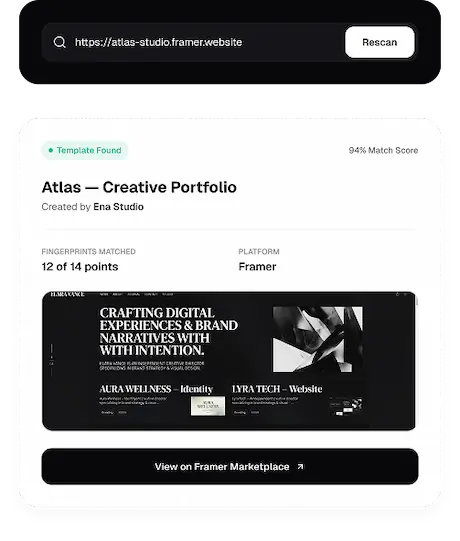
TemplateDex is a free tool built specifically for this problem. Paste in the URL of a Framer website and it will compare technical match points from the live site against indexed Framer Marketplace templates.
Instead of relying only on how the website looks, TemplateDex looks for signals that can remain even after the template has been customized.
If a likely match is found, you'll see the template name, creator, match percentage and a link to the original Marketplace listing.
Compare structure, not just appearance
If you want to search manually, focus on the parts of the site that are less likely to change than colors and images.
Look at things like the page structure, navigation, major sections, CMS-driven content and how the site is organized. These can sometimes make a template easier to recognize even after the visual design has changed.
A matching hero section alone usually isn't enough. Many Framer templates use similar layouts and design patterns.
Search the Framer Marketplace manually
You can also browse the Framer Marketplace and search for templates in the same category as the website.
If you're looking at a SaaS website, for example, start with SaaS and startup templates instead of browsing the entire Marketplace.
Once you find a candidate, compare several pages and sections rather than just the homepage.
What if multiple templates look like a match?
Sometimes there isn't one clear answer. Templates can share very similar structures, and some may be closely related versions of the same underlying design.
In those cases, it's better to treat several templates as possible matches rather than claiming that one specific listing is definitely the original.
What if no template matches?
Not every Framer website started from a Marketplace template. The site may have been built from scratch, based on a private template, or customized so heavily that the original template is difficult to identify confidently.
A weak match is not the same as a confirmed match. If the evidence isn't strong enough, it's better to leave the result uncertain.
Ask the site owner or designer
If automated and manual searches don't give you an answer, asking the site owner, designer or agency is still an option. They may be happy to tell you which template they started from.
Quick summary
Finding the original Framer template is easiest when you compare more than just the visual design. Customizations can make a template look completely different while parts of its underlying structure remain.
You can search the Marketplace manually, compare the structure of likely candidates, or use TemplateDex to check the site against indexed Framer templates automatically.
Not sure whether the website was built with Framer in the first place? Read how to tell if a website is built with Framer.